Slider
A slider lets the user pick a number within a range by dragging a handle. RangeSlider has two handles and
selects an interval, e.g. a price range. Both live in package presentation/ui/slider and bind to a state:
*core.State[float64] for the slider and *core.State[slider.RangeSliderValue] with the fields From and To
for the range slider.
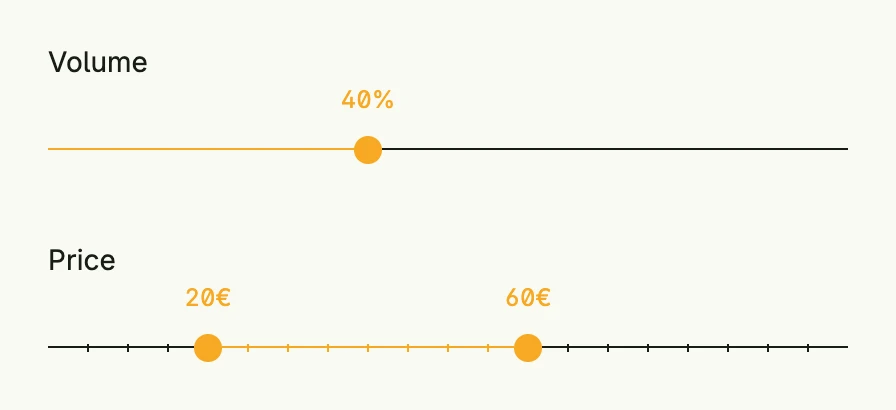
volume := core.AutoState[float64](wnd).Init(func() float64 { return 40 })
price := core.AutoState[slider.RangeSliderValue](wnd).Init(func() slider.RangeSliderValue {
	return slider.RangeSliderValue{From: 20, To: 60}
})

VStack(
	slider.Slider(0, 100).
		Label("Volume").
		Unit("%").
		InputValue(volume).
		Frame(Frame{Width: L400}),
	slider.RangeSlider(0, 100).
		Label("Price").
		Unit("€").
		Step(5).
		ShowMarkers(true).
		InputValue(price).
		Frame(Frame{Width: L400}),
).Alignment(Leading).Gap(L32)
Constructors
| Constructor | Description |
|---|---|
func Slider(min, max float64) TSlider | Creates a slider with the given range. |
func RangeSlider(min, max float64) TRangeSlider | Creates a range slider with the given range. |
Methods
TSlider and TRangeSlider have the same methods; they only differ in the type of the value.
| Method | Description |
|---|---|
Disabled(disabled bool) TSlider | Disabled disables or enables the slider. |
ErrorText(text string) TSlider | ErrorText sets an error message for the slider. |
Frame(frame ui.Frame) TSlider | Frame sets the layout frame of the slider (size, width, height, etc.). |
InputValue(input *core.State[float64]) TSlider | InputValue binds the slider to a reactive state. |
Label(label string) TSlider | Label sets the label text of the slider. |
Max(max float64) TSlider | Max defines the max value of the slider. |
Min(min float64) TSlider | Min defines the min value of the slider. |
ShowMarkers(showMarkers bool) TSlider | ShowMarkers defines whether to show markers on the slider. |
Step(step float64) TSlider | Step defines the step size to increase/decrease number values stepwise. |
SupportingText(text string) TSlider | SupportingText sets helper text for the slider. |
Unit(unit string) TSlider | Unit defines the unit to be displayed next to the value. |
Value(value float64) TSlider | Value sets a static value for the slider. |
For TRangeSlider, InputValue takes a *core.State[RangeSliderValue] and Value a RangeSliderValue.
Related
- Text Field with
IntFieldandFloatField - Tutorials: Slider