Font
A Font sets the family, size, style, weight and line height of text. Use the predefined fonts of the design
system, which follow a type scale from DisplayLarge down to LabelSmall, or define your own. Texts, buttons,
stacks and other components take it through their Font method; a stack passes it on to the texts inside.
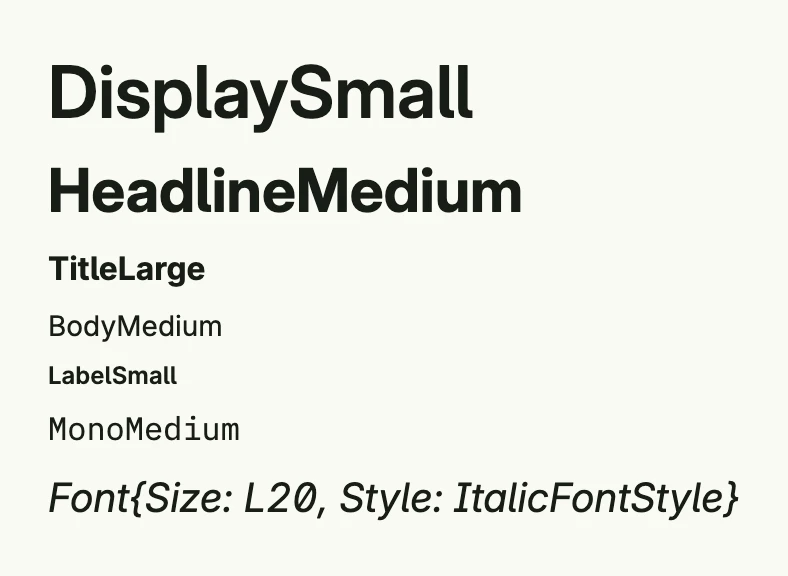
return VStack(
	Text("DisplaySmall").Font(DisplaySmall),
	Text("HeadlineMedium").Font(HeadlineMedium),
	Text("TitleLarge").Font(TitleLarge),
	Text("BodyMedium").Font(BodyMedium),
	Text("LabelSmall").Font(LabelSmall),
	Text("MonoMedium").Font(MonoMedium),
	Text("Font{Size: L20, Style: ItalicFontStyle}").Font(Font{Size: L20, Style: ItalicFontStyle}),
).Alignment(Leading).Gap(L8)
Predefined fonts
| Group | Variables |
|---|---|
| Display | DisplayLarge, DisplayMedium, DisplaySmall |
| Headline | HeadlineLarge, HeadlineMedium, HeadlineSmall |
| Title | TitleLarge, TitleMedium, TitleSmall |
| Body | BodyLarge, BodyMedium, BodySmall |
| Label | LabelLarge, LabelMedium, LabelSmall |
| Monospace | MonoLarge, MonoMedium, MonoSmall, MonoBoldLarge, MonoBoldMedium, MonoBoldSmall, MonoItalicLarge, MonoItalicMedium, MonoItalicSmall |
| Older names | Title, SubTitle, Large, Small, Monospace |
Fields
| Field | Description |
|---|---|
Name FontName | Font family, e.g. DefaultFontName (Inter) or MonoFontName (IBM Plex Mono). |
Size Length | Font size as a Length. |
Style FontStyle | NormalFontStyle or ItalicFontStyle. |
Weight FontWeight | Numeric weight, e.g. BodyFontWeight (400) or HeadlineAndTitleFontWeight (700). |
LineHeight LineHeight | Line height as a CSS value. |
Font has no methods.
Related
- Text, Text Layout
- Tutorials: Custom font, Font variations, Typography